Introduction
If your website isn’t ranking on Google, the issue may not be your content — it’s your technical SEO.
Many beginners focus only on keywords and backlinks, but ignore the technical foundation of their website. Without proper technical SEO, search engines cannot effectively crawl, index, and understand your content, which directly impacts your rankings.
In this complete technical SEO guide, you’ll learn everything from basic concepts to advanced strategies that can help you improve your website’s performance and visibility in 2026.
🚀 What is Technical SEO?
Technical SEO is the process of optimizing your website’s backend structure and performance so search engines can easily access and interpret your content.
It ensures that:
- Your website is crawlable
- Your pages are properly indexed
- Your content is understood by search engines
Unlike on-page SEO (which focuses on content) and off-page SEO (which focuses on backlinks), technical SEO focuses on the infrastructure of your website.
🧱 Core Pillars of Technical SEO
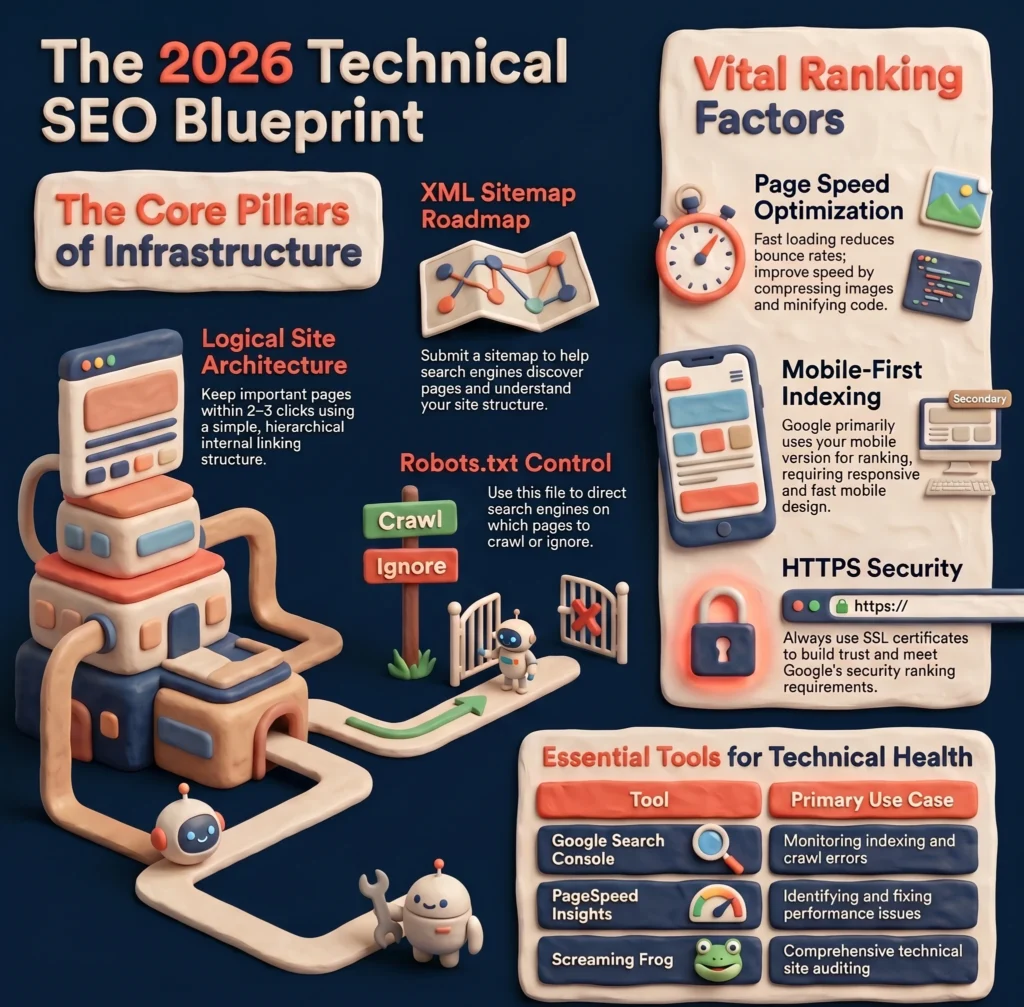
1. Website Architecture
A well-structured website helps both users and search engines navigate easily.
Best practices:
- Keep a simple and logical structure
- Important pages should be within 2–3 clicks
- Use clear internal linking
Example structure:
Homepage → Category → Blog Post
2. XML Sitemap
An XML sitemap acts as a roadmap for search engines.
It helps them:
- Discover your pages faster
- Understand your website structure
You should always submit your sitemap in Google Search Console to ensure proper indexing.
3. Robots.txt
The robots.txt file tells search engines which pages they should or shouldn’t crawl.
Important tips:
- Don’t block important pages
- Use it carefully to avoid de-indexing key content
⚡ Key Ranking Factors in Technical SEO
1. Page Speed
Website speed is one of the most important ranking factors.
Why it matters:
- Slow websites increase bounce rate
- Users leave quickly
- Google lowers rankings
How to improve:
- Compress images
- Use browser caching
- Minify CSS, JavaScript, and HTML
2. Mobile-Friendliness
Google uses mobile-first indexing, which means it primarily uses the mobile version of your site for ranking.
Ensure:
- Responsive design
- Fast mobile loading speed
- Easy navigation on small screens
3. HTTPS Security
Security is essential for both users and search engines.
- Install an SSL certificate
- Always use HTTPS instead of HTTP
Secure websites build trust and rank better.
🧠 Advanced Technical SEO Strategies
1. Schema Markup (Structured Data)
Schema markup helps search engines understand your content better.
Benefits:
- Rich snippets in search results
- Higher click-through rate (CTR)
Examples include:
- FAQs
- Reviews
- Articles
2. Canonical Tags
Canonical tags are used to solve duplicate content issues.
If multiple URLs have similar content, a canonical tag tells Google which version is the main page.
This helps:
- Avoid duplicate penalties
- Consolidate ranking signals
3. Hreflang Tags
Hreflang tags are important for websites targeting multiple countries or languages.
They help search engines:
- Show the correct version to the right audience
- Improve international SEO
🤖 Technical SEO for AI & Future Search
With the rise of AI-powered search engines, technical SEO is becoming more important than ever.
AI systems rely on:
- Structured data
- Clean site architecture
- Fast loading pages
If your website is technically optimized, it becomes easier for AI to understand and recommend your content.
👉 Future SEO is all about being machine-readable and user-friendly at the same time.
🔍 Technical SEO Audit (Step-by-Step)
Performing regular audits is essential to maintain your website’s health.
Step 1: Check Indexing
Use Google Search Console to see which pages are indexed.
Step 2: Identify Crawl Errors
Look for:
- 404 errors
- Broken links
Fix them immediately to improve user experience.
Step 3: Improve Website Speed
Use tools like Google PageSpeed Insights to identify performance issues and fix them.
Step 4: Fix Technical Issues
Check for:
- Redirect chains
- Duplicate content
- Missing meta tags
- Incorrect canonical tags
❌ Common Technical SEO Mistakes
Avoid these common mistakes:
- Ignoring website speed
- Not using HTTPS
- Blocking important pages in robots.txt
- Duplicate content issues
- Missing XML sitemap
Even small mistakes can hurt your rankings significantly.
🛠️ Best Tools for Technical SEO
Here are some essential tools:
- Google Search Console
- Screaming Frog
- Google PageSpeed Insights
These tools help you monitor your website and fix technical issues effectively.
📋 Technical SEO Checklist
Use this quick checklist:
✔ Website loads fast
✔ Mobile-friendly design
✔ HTTPS enabled
✔ XML sitemap submitted
✔ Robots.txt optimized
✔ No broken links
✔ Proper URL structure
✔ No duplicate conten
⭐ Testimonials
“WebZonic Agency completely transformed our website performance. After fixing technical SEO issues, our rankings improved within weeks.” — Ahmed R., Business Owner
“Muhammad Taha did an amazing job with our technical SEO audit. He identified issues we didn’t even know existed.” — Sarah K., E-commerce Manager
“Our website speed and indexing improved significantly after implementing their technical SEO recommendations.” — Ali M., Startup Founder
❓ People Also Ask (FAQs)
What is technical SEO in simple words?
Technical SEO is the process of improving your website’s backend so search engines can easily crawl, index, and understand your content. It focuses on performance, structure, and usability rather than content or backlinks.
Why is technical SEO important for ranking?
Technical SEO ensures that your website is accessible to search engines. Without it, even high-quality content may not rank because search engines cannot properly crawl or index your pages.
What are the main elements of technical SEO?
The key elements include:
- Website speed
- Mobile-friendliness
- XML sitemap
- Robots.txt
- HTTPS security
- Structured data (schema markup)
How often should I do a technical SEO audit?
You should perform a technical SEO audit:
- Once every month (for active websites)
- After major website changes
- When rankings suddenly drop
What is the difference between technical SEO and on-page SEO?
- Technical SEO focuses on website performance and structure
- On-page SEO focuses on content, keywords, and optimization
Both are essential for ranking.
Can technical SEO improve website speed?
Yes, technical SEO directly improves website speed by optimizing images, caching, code, and server performance.
🔗 Related Guide (Must Read)
👉 Complete SEO Guide for Beginners Step-by-Step (2026)
🎯 Final Thoughts
Technical SEO is the backbone of your website.
Without it, even the best content may fail to rank.
But when your technical foundation is strong:
- Search engines can easily crawl your site
- Your pages get indexed faster
- Your rankings improve
If you want long-term success in SEO, start focusing on technical SEO today.
🚀 Want faster results?
WebZonic Agency offers professional SEO services to help your business rank higher, attract more traffic, and grow online. Get in touch today and take your website to the next level.
👤 Author Bio
Muhammad Taha is an SEO Specialist at WebZonic Agency, specializing in on-page, off-page, and technical SEO. He helps businesses improve their online visibility, fix SEO issues, and drive organic traffic through data-driven strategies.